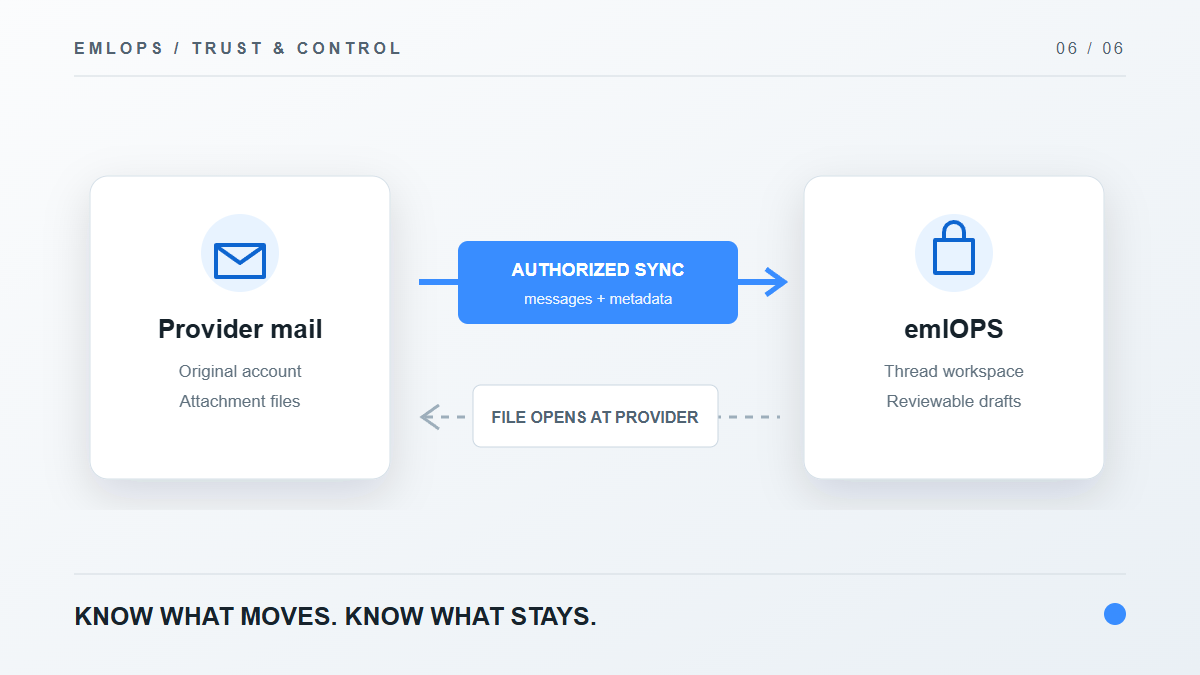
Does emlOPS store your email? It synchronizes authorized message and thread data into an organization-scoped workspace so the inbox, projects, search and draft workflow can function. It does not merely show an iframe of Gmail, and it should not be described as “saving nothing.” Attachment files follow a different path: the workspace keeps their metadata, while the file bytes remain at the mail provider for a direct open or download.
This is the kind of answer a customer deserves before granting mailbox access. The useful privacy question is not just “Is there encryption?” It is “What data is copied, what action can the app take, and how do I disconnect?”
What does the connection authorize?
A supported account is connected through the provider's authorization flow. The app receives the permissions needed for the requested mailbox operations; the exact consent screen and available operations depend on the provider. emlOPS then synchronizes threads and message data so it can show the work queue, organize conversations and prepare drafts.
The product keeps provider credentials and tokens on the server side, protected separately from the browser-facing application. Account and workspace access are scoped by authentication, membership and row-level database rules. A user signing in with Google does not automatically gain access to a paid or private emlOPS workspace.
Those controls should be checked in practice, not inferred from a badge. If the app displays a provider as setup pending, its connection has not completed the production checks needed for ordinary customer use.
Where do attachments live?
The emlOPS thread view can show an attachment's filename, content type and size. The underlying bytes remain with the email provider. Opening an attachment uses the provider path to deliver the file to your device; the workspace does not need to keep a second permanent attachment archive for this feature.
That distinction does not mean the rest of the message is never stored by emlOPS. The service maintains synchronized thread and message data to support its core workflow. Treat both facts together when evaluating the service.
What can AI do with the connected mail?
AI preparation is tied to an authorized thread and a deliberate operator request. The current draft path loads a bounded recent segment of that conversation, proposes a response and stores the result for review. Managed AI and supported bring-your-own providers have different billing paths and usage controls. The application does not grant a model permission to send a message autonomously.
If you want the details of the approval boundary, read AI drafts the reply; you make the call. The public Privacy and Security pages describe the current policies and technical posture; they are the right places to check for updated retention, deletion and processor information.
What happens if I disconnect an account?
The provider connection should stop future synchronization, and the product has account disconnect and deletion paths. The exact retention and deletion timing is governed by the current privacy terms and the account flow in the app. Do not assume that revoking an OAuth grant at the provider automatically erases every previously synchronized workspace record.
Before using a connected-mail product for sensitive work, verify the provider permissions, your organization's workspace membership, the disconnect path and the published data policy. If those terms are not clear, contact info@emlops.com before connecting a mailbox.
A straightforward trust checklist
- Confirm you are signing in to the intended emlOPS workspace and provider account.
- Read the permissions on the provider consent screen.
- Verify that only the accounts you selected appear as connected.
- Check a thread and an attachment so you understand where each opens.
- Prepare a draft and confirm it is not sent without your action.
- Locate the account disconnect and deletion controls before you need them.
Frequently asked questions
Is emlOPS read-only?
No. It can support organization, archiving and provider-draft operations after authorization. It does not send a message on its own in the supported workflow.
Does emlOPS keep a copy of an attachment file?
The current attachment flow stores metadata and opens the file from the provider. The provider hosts the attachment bytes.
Can anyone with my email address see the workspace?
No. Workspace membership and entitlement are separate from knowing an address or completing a Google sign-in.
Product details reviewed September 23, 2026. Always consult the current Privacy and Security pages for binding product notices and account controls.
Have a question or a correction?
Talk to the emlOPS team